
FAQ
BRP BUDS Diagnostic System
How to Contact Us for Help?
If you wish to contact us for any issues related to BRP vehicle diagnostics, please provide the following information:
To fully understand the issues related to the use of the B.U.D.S. diagnostic system, you need to specify:
- A detailed description of the problem.
- The full model name and year of the vehicle.
- Which version of B.U.D.S. was used for the diagnostic procedures?
- What diagnostic equipment (interfaces and cables) was connected between the PC and the vehicle?
- If an error window appeared during diagnostics, please send a screenshot.
- The saved MPEM document of the vehicle.
Providing this information will significantly speed up the resolution of the problem.
Download license comparison chart for BUDS2 for free
BUDS 2 ( BRP Utility and Diagnostic Software) is a comprehensive multi-language diagnostic software that gives you an insight on BRP electronic modules. Used on vehicles of 2017 and newer!
B.U.D.S. ( BRP Utility and Diagnostic Software) is a comprehensive multi-language diagnostic software that gives you an insight on BRP electronic modules.
Using B.U.D.S. program, you can:
- Edit vehicle information
- Test, add or remove DESS keys
- Adjust engine parameters
- Activate module outputs
- Stop the engine
- Monitor vehicle parameters
- Troubleshoot vehicle faults
- Replace a module
- Update module software and/or calibration data
- Read and reset historical data
- Save vehicle information to disk
- Print vehicle information
If you want to test the program B.U.D.S, you can download the program HERE.
MINIMUM SYSTEM REQUIREMENTS
To install B.U.D.S. (Bombardier Utility and Diagnostic Software) you need:
• 486 processor or higher (Pentium recommended).
• Microsoft Windows 95/98, NT 4.0, ME, XP or Windows 2000 or higher.
• 4 Mb of RAM (16 Mb (or higher) recommended).
• 10 Mb of hard disk space (compact).
• CD ROM disk drive. (optional)
• VGA or higher resolution display (SVGA).
• Mouse or other pointing device.
• One unused USB port.
NOTE: B.U.D.S. does not work with Windows 3.x.
License key required to "unlock" BUDS program.
Dealers license (standart diagnostic mode) - SkiDoo, SeaDoo, PWC, ATV, Roadster, SSV
Skidoo - diagnosis of snowmobiles,
SeaDoo - diagnosis of boats,
PWC - diagnosis of personal watercraft,
ATV - diagnosis of Quads,
Roadster - diagnosis of tricycles,
SSV - diagnostic of Side-By-Side.
BRP provide license keys for authorized dealers, for certain brands, that are serviced by dealers. For example, the dealer "ATV" can not serve the "Roadster", because it can not connect to the system! Or, the dealer "PWC" can not serve "SeaDoo Sport Boats".
We can provide all license keys for existing MPI-1, MPI-2 and MPI-3 adaptors for ALL BRP products! License keys with any period of validity.
We can give you a trial license key for your adapter MPI-2. Trial license key MEGATECH 7 days, for evaluation of opportunities.
We can give you a trial license key for your adapter MPI-2. Trial license key MEGATECH 7 days, for evaluation of opportunities.
License key "MEGATECH" is a one option of license which offers great opportunities, which are not available for dealers!
MEGATECH - a license key of developers of the program BUDS. This key is not available to dealers and distributors BRP.
The license key is designed for advanced configuration of the electronic units, as well to clear the history and Information of blocks and to recover from incorrect updating of blocks.
License key Megatech (enhanced diagnostic mode) include: All licenses of dealers (SkiDoo, SeaDoo, PWC, ATV, Roadster, SSV), Developer's license, Engineer's license, license key Megatech.
Megatech Key Features:
1. Changing of the VIN number, MODEL number.
2. Advanced settings.
3. View stories in hours, rather than percentage.
4. Enabling / Disabling DESS.
5. Change the key type without reprogramming (normal, learning, rental).
6. Clear the history of the blocks ECM, MPEM (history of substitutions).
7. Cleaning unit ECM, MPEM, CLUSTER "as new" (resetting the hours on 4-TEC Seadoo, up to 2010).
8. View more information blocks.
9. Installing Secure Code.
10. Edit curves for 2-Stroke vehicles and new E-TEC (Skidoo).
You can purchase license keys with such validity:
1 year;
2 years;
5 years;
10 years;
During the purchase of equipment for the diagnosis, you can specify the validity of the license key 1 or 2,5,10 years.
If you want to change the license key for a longer duration, please contact the site administrator via private message.
Yes, you can buy from us only a license key for BUDS.
Register on our site and write a private message to the site administrator. In your message, please include the serial number of your MPI-2 and MPI-3 adapter and the type of license you want to buy.
In reply we will send you a trial license and a list of prices for licenses.
For our clients we are opening access to our FTP-site, which contains a surprising quantity of materials! All the latest software BUDS, service manuals, dozens of PDF files and Bulletins!
Special folder "UPDATES" contains all the updates that came after the release of the latest software. Any client can download this update and add to the program manually. The next release of the new program includes all the updates.
By registering on our site and subscribing for updates, our clients receive information about software updates. For our clients - updates are supplied free of charge.
Very frequently asked questions about which version of BUDS and what equipment use to diagnose vehicles BRP.
For the diagnosis of 2-stroke vehicles required:
1. MPI-3 adapter.
2. DESS Post EFI/RFI/DI/4-TEC.
3. 2-stroke cable.
4. MPI-3 cable.
5. License key for B.U.D.S.
For the diagnosis of 4-stroke vehicles required:
1. MPI-3 adapter.
2. MPI-3 cable.
3. DESS Post EFI/RFI/DI/4-TEC. (for add keys for SeaDoo, SkiDoo)
4. License key for B.U.D.S.
We have developed a DESS 4-TEC, which reduces the cost of equipment for those who do not work with 2-stroke engines.
More information on the use of kits for diagnosis you can get by downloading the file BUDS CHART
This depends on the model of your adapter. Today, there are two models of adapters: MPI-1, MPI-2 and MPI-3
MPI-1 - the old adapter, able to work in three main protocols: KW2000-250k, DESS, 947-DI. Communicates with the computer via RS-232, also called a COM port. It supports almost all models 4-TEC, which support the exchange rate 250k KW2000 protocol as well as the entire line of 2-stroke technology. Due to lack of KW2000 protocol with baud rate 500k is not able to handle E-TEC technology, and some models of ATV Can Am.
MPI-2 and MPI-3 - a modern adapter USB, which uses the protocol CAN, supports transfer rate of 25 to 1000k. For the diagnosis of BRP vehicles used KW2000-250k and KW2000-500k. As a standalone unit, supports vehicles 4-TEC and E-TEC, without the possibility of record keys. With prefix DESS Post is able to register the keys, and is able to serve the full range of vehicles BRP, including old-style, like his younger brother, the MPI-1.
MPI-1 adapter is no longer supported by software.
The latest software B.U.D.S. only works with MPI-2 and MPI-3 adapter.
DIUS (Diagnostic Intellectual Universal System)
DIUS (Diagnostic Intellectual Universal System)
DIUS is a diagnostic intelligent universal system.
Introduction
Chip tuning is the electronic increase in vehicle power. It refers to the modification of the EPROM in the electronic control unit (ECU/ECM) to achieve better performance: more power, cleaner emissions, or better fuel economy.
Engine manufacturers typically use a conservative ECU map to account for individual engine variations, as well as infrequent maintenance and poor fuel quality. Vehicles with a reflashed engine control unit may be more sensitive to fuel quality and maintenance schedules.
Modern BRP vehicle ECUs, along with advanced engine technologies, allow control over many aspects of engine operation: ignition timing, fuel injection, electronic throttle control, camshaft phasing, and boost control.
Performance gains are achieved by adjusting ignition advance. Higher timing can lead to higher performance. However, to handle advanced timing, high-octane fuel must be used to avoid premature detonation or knocking.
How Does It Work?
The most common way to "upgrade" an ECU is by using plug-in modules or a specialized tuner that utilizes an OBD Flash tool. These devices typically connect to the diagnostic port, although in some cases, reprogramming is done directly on the circuit board (opening the ECU, replacing the EEPROM chip).
Our Solution: DIUS Flasher
We offer you a way to restore or improve the firmware in the ECU (ECM) of your BRP vehicle without opening the ECU module housing.
We present to you our DIUS Flasher 4.0 software. It is primarily intended for experienced users and repair shops.
The software allows you to restore or replace the standard (stock) firmware with another standard or tuning firmware (with improved fuel maps) in the ECUs of 4-TEC and E-TEC BRP models (Sea-Doo, Can-Am, Ski-Doo).
Important: DIUS Flasher does not allow you to modify firmware data (fuel maps, fuel pressure, RPM range, etc.). It is a tool for restoring and replacing ready-made files.
Compatibility
The software runs on Windows XP SP3 and Windows 7 with the original IXXAT adapter and MPI-2, MPI-3 interfaces.
Thanks to DIUS Flasher 4.0, you can restore or replace firmware in the following ECU models:
- Siemens VDO MSE 3.7 R / xx (manufactured 2004-2017);
- BOSCH Motronic ME17.8.5.
The manufacturing date of the Siemens VDO MSE 3.7 ECU is indicated on the module label.
Software Versions
- SeaDoo Edition — unlimited use of all standard firmware for Sea-Doo PWC and sport boats.
- SkiDoo Edition — unlimited use of all standard firmware for Ski-Doo snowmobiles.
- Can-Am Edition — unlimited use of all standard firmware for ATV, SSV, and Roadster Spyder.
- Repair Edition — unlimited use of all standard firmware for all 4-TEC / E-TEC BRP vehicles.
- One File Edition — the buyer can purchase one standard or tuning firmware (one firmware can be used to flash only one ECU).
DIUS 4 User Registration
1. DIUS 4 is designed to operate only on a single computer!
User registration must be done on the computer that will be used to work with DIUS 4.
2. Internet connection is required to activate/reactivate DIUS 4.
In order to protect intellectual property, DIUS 4 activation is performed for a period of 14 days from the date of registration of a new user, and it is reactivated for a period of +14 days after each update of DIUS 4.
3. For proper operation of DIUS 4 on computers with Windows 10 Home, you must additionally install (or enable them in Windows features):
- Microsoft .NET Framework 2.0 Service Pack 1 (x64) — Download
- Microsoft .NET Framework 3.0 Service Pack 1 — Download
- Microsoft .NET Framework 3.5 Service Pack 1 — Download
- Microsoft Visual C++ 2010 x86 Redistributable — Download
DIUS 4 software does not require installation and is launched from a folder.
We strongly recommend that you unzip the DIUS 4 archive on a removable USB memory stick that will only be used to store DIUS 4. In this case, you can only connect the USB memory stick to the computer when you need to use DIUS 4. In addition, DIUS 4 will be protected from computer hard drive failures.
To start DIUS 4, run DIUS X.X.X.exe.

When you first time run it a New User Registration window will open.

Enter your details and click on "Register New User ..."

Confirmation of successful registration will be sent to the specified email.

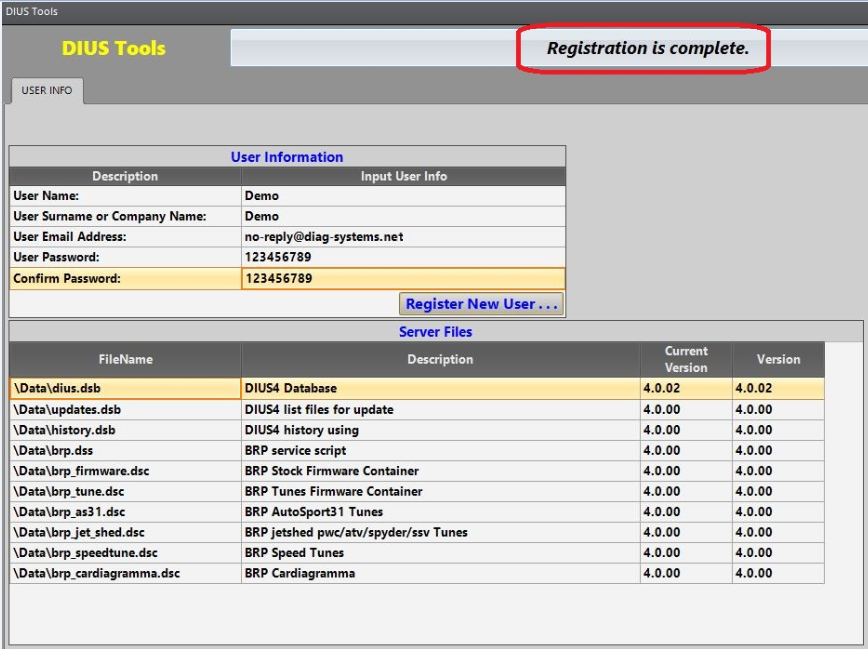
After successful user registration DIUS 4 will automatically restart.
Read the disclaimer carefully and close it.

Press on Ok and open the DIUS Tools.

Update the DIUS Tools.

Updating in progress.

Close DIUS Tools after Update Complete.

Press F12 on the keyboard (to refresh the window contents) and press on button "BRP".

Open ECM Firmware.

At the moment, two containers of firmware are available for users:
- BRP DIUS Flasher 4.0 STOCK
- BRP DIUS Flasher 4.0 Tunes
Select the container you are interested in and open the list of firmware below.

Please note: you can see the entire list of firmware available for purchase.
After user registration, all firmware counters are set to "0".
If you have already bought any version of DIUS 4 (or you are our customer of any version of DIUS 3), or you already bought only one firmware DIUS 4 (or several firmware), then expect a message from the dealer that "your firmware or version of DIUS 4 has been successfully added to your account".

The ECM Hardware number (HW) is an important parameter of ECM BOSCH Motronic ME17.8.5.
Each firmware (SW) is designed for ECM with a specific Hardware number.
DIUS 3 software allowed ECM programming only with firmware that was designed for the same HW number as the programmable ECM. Neglect of this restriction led to the failure of the ECM.
DIUS 4 software supports firmware programming for ECMs with a different HW (changing the HW during process).
Currently, in BRP vehicles are used ECMs BOSCH Motronic ME17.8.5 with Hardware numbers 666060-666067.
Depending on the HW numbers of ECM and Firmware, reprogramming of ECM can be done in one or two passes.
ECM Reflash 1 pass is used in the following cases:
- The HW numbers of ECM and Firmware are identical.
- The HW numbers of ECM and Firmware are any of 666060-666062.
ECM Reflash 2 passes is used in the following cases:
- The HW number of ECM is one of 666060-666062, and the HW number of firmware is one of 666063-666067.
- The HW numbers of ECM and Firmware are any of 666063-666067 but not are identical.
ECM Reflash 1 pass
Connect MPI interface to computer and to vehicle. Run DIUS 4. Press the BRP button.

You will see the data of your connected MPI. To read the electronic modules of connected vehicle, you must press the button IXXAT:

DIUS 4 will show the connected modules. Here you can see the current HW number and Firmware number (BRP Assembly Number) 420666378. In our example, we are using ECM with Hardware number 666062.
Open the ECM Firmware tab.

- Select the Container. The BRP DIUS Flasher 4.0 Stock and BRP DIUS Flasher 4.0 Tunes containers are currently available.
- Select the Vehicle type, HW number and firmware (SW) you want to load into ECM. In this example, we will use the firmware 420666373 designed for ECM with Hardware number 666062.
- Click on the REFLASH button.
- Confirm your decision by clicking on OK.

Reprogramming process in progress:

The reprogramming process will be completed when the Transfer Data Bytes counter reaches 100000. After successful process completion, the status bar will change to Read INFO Complete:

Press F12 on your keyboard to refresh the ECM Firmware page. The counter Used will show +1 more used firmware. This means that the firmware programming process is completed successfully.
Open tab Selector.

Here you can see that the BRP Assembly Number has been changed from 420666378 to 420666373:

ECM Reflash 2 passes
Connect MPI interface to computer and to vehicle. Run DIUS 4. Press the BRP button.

You will see the data of your connected MPI. To read the connected vehicle, you must press the button IXXAT.

DIUS 4 will show the connected modules. Here you can see the current Hardware number and Firmware number (BRP Assembly Number). In our example, we are using ECM with Hardware number 666062.
Click the ECM Firmware tab.
- Select the container.
- Select the Vehicle type, HW number and firmware (SW) you want to load into ECM. In this example, we specifically will use the firmware designed for ECM with Hardware number 666064.
- Click on the REFLASH button.
- Confirm your decision by clicking on OK.

Reprogramming process in progress:

Since the HW number of the firmware does not match the HW number of the ECM, after the transfer of a certain amount of data, the programming process will be interrupted by the following message: “Close the BRP window for change the protocol and try flashing again”.
Click on OK and close this window.

Press the BRP button.

Press the button IXXAT to read the connected vehicle.
Open the ECM Firmware button.

- Select the same container.
- Select the same Vehicle type, HW and SW.
- Click on the REFLASH button.
- Confirm your decision by clicking on OK.
The programming process will continue.
The reprogramming process will be completed when the Transfer Data Bytes counter reaches 100000. After successful completion, the status bar will change to Read INFO Complete:
Press F12 on your keyboard to refresh the ECM Firmware page. The counter Used will show +1 used firmware. This means that the firmware programming process is completed successfully.
Open tab Selector.

After reprogramming of ECMs with HW numbers from 666060-666062 to 666063-666067 the final HW number will be displayed as 000000. The same situation occurs if ECM with any HW number within 666063-666067 was programmed by firmware designed for a different HW number of ECM. This does not affect anything, so you should not worry.

Privacy Policy
Last updated: November 11, 2026.
This Privacy Policy (the "Policy") applies to the processing of personal data that may be collected by the website magelan.net.ua (the "Site"). The Policy is developed in accordance with the Constitution of Ukraine, the Law of Ukraine "On Personal Data Protection" No. 2297-VI dated 01.06.2010, and the General Data Protection Regulation (EU) 2016/679 (GDPR).
1. Composition of Personal Data
We process the following personal data of the User:
- First name and Last name;
- Phone number;
- Delivery address (country, city, postal code, street, building);
- Email address;
- Payment information (not stored on our server, processed by payment systems);
- IP address, browser and device data (collected automatically for analytics).
2. Purposes of Personal Data Processing
We use your personal information solely for the following purposes:
- Order Processing and Delivery: accepting and processing orders, processing payments, communicating with you regarding orders and services.
- Technical Support: ensuring the operation of the Site, performance analysis, bug fixing.
- Service Improvement: recommending products and services that may be of interest to you.
- Legal Obligations: compliance with the requirements of Ukrainian legislation and GDPR.
3. Basic Principles of Processing
Personal data processing is based on the principles of legality, fairness, and transparency. We process only the data necessary to fulfill orders and improve service quality. Personal data is destroyed or anonymized once the processing purposes are achieved.
4. Personal Data Protection
All confidential data you transmit is encrypted using Secure Socket Layer (SSL) technology. You can verify this by looking at the lock icon in the address bar and the "https" at the beginning of the address.
Only employees who need it to perform their duties (e.g., billing or customer support) have access to personal data.
5. Cookies
We use cookies to display content correctly and simplify navigation. They help the Site remember information about you (language, pages visited). You can disable cookies in your browser settings, but this may limit the functionality of the Site.
Our Site also uses third-party services (Google Analytics, Facebook, Instagram, YouTube) that collect data independently of us. You can review their privacy policies on their official websites.
6. Your Rights
In accordance with GDPR and Ukrainian legislation, you have the right to:
- Access information: you can request a copy of your personal data that we process.
- Change and delete: you can correct or delete your data in your personal account or by contacting us.
- Withdraw consent: you can withdraw your consent to personal data processing at any time.
To exercise your rights, please contact us at: brpdiagnostic@ukr.net.
7. Retention Periods
We retain your personal data no longer than the processing purposes require. Unused accounts are deleted after a period of inactivity of 2 years.
8. Contacts
If you have any questions, comments, or complaints regarding the processing of personal data, you can contact the Administration:
- Name: Sergey Zaytsev
- Address: Ukraine, Zaporizhzhia, 69093, Zestafonska St. 4a, 20.
- Email: brpdiagnostic@ukr.net
- Phone: +380676136675
You also have the right to contact the Ukrainian Parliament Commissioner for Human Rights (Ombudsman) regarding personal data protection.
Refund Policy
Question: Can I return digital goods (licenses)?
Answer: Returns of digital goods are possible only before the license key is activated. Once the key is activated, the return is not possible. This is because the key is already linked to your equipment.
Question: Can I return a physical item (adapter)?
Answer: Yes, you can return or exchange a physical item within 14 days of receipt, provided it has not been used, is in its original packaging, and shows no signs of installation.
Question: What should I do if the adapter is defective?
Answer: We provide a 1-year warranty for diagnostic equipment. If the malfunction is not your fault, we will repair or replace the item free of charge. If the damage is caused by improper use (reverse polarity, moisture, opening the housing), the repair is paid separately.
Question: How do I request a return?
Answer: To submit a return request, email us at brpdiagnostic@ukr.net or fill out the form on the "Return Policy" page. We will respond within 24 hours.